Fees Panel
The Fees panel is used to define the fees to automatically add to vehicle proposals generated in the XtreamService application. Fees can be defined as upfront fees or included in the overall deal amount.

|
The Fees panel displays on the Proposal Generation Settings screen. To access the Proposal Generation Settings screen, click the |
 (More) icon and then click the Proposal Generation Settings link in the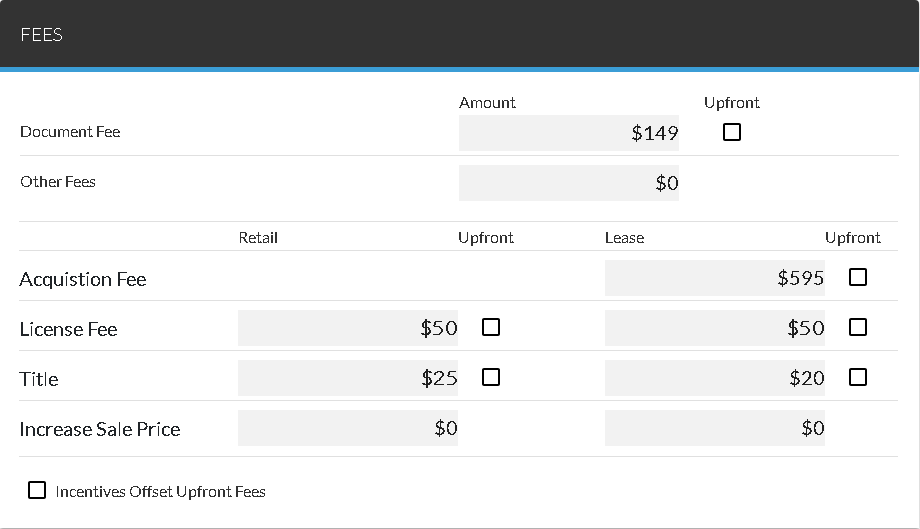
The settings defined on this panel are applied to all proposals generated by the XtreamService application.
The following items are available in the Fees panel.
Document Fee: Enter the document fee to automatically add to proposals.
Upfront: Select this check box to indicate that the corresponding fee should be paid upfront on the vehicle deal. Upfront costs cannot be financed as part of the deal.
Other Fees: Enter a miscellaneous fee to automatically add to proposals.
Acquisition Fee - Lease: Enter the acquisition fee to automatically add to lease proposals.
License Fee - Retail: Enter the license fee to automatically add to retail proposals.
License Fee - Lease: Enter the license fee to automatically add to lease proposals.
Title - Retail: Enter the title fee to automatically add to retail proposals.
Title - Lease: Enter the title fee to automatically add to lease proposals.
Increase Sale Price - Retail: Enter an amount to automatically increase the sale price for retail proposals.
Increase Sale Price - Lease: Enter an amount to automatically increase the sale price for lease proposals.
Incentives Offset Upfront Fees: Select this check box to use incentive to pay for fees that are indicated as upfront fees. The lead sheet still displays these fees; however, the total amount for the selected fees is offset using incentives for the customer.
Click here for a list of products that may be mentioned in this help file.